Unity Asset - Avatar Maker Pro - 3D avatar from a single selfie v1.3.1
This post was published 5 years ago. Download links are most likely obsolete. If that's the case, try asking the uploader to re-upload.
Requirement: Unity 2018.3.6 or higher | File size: 136 MB
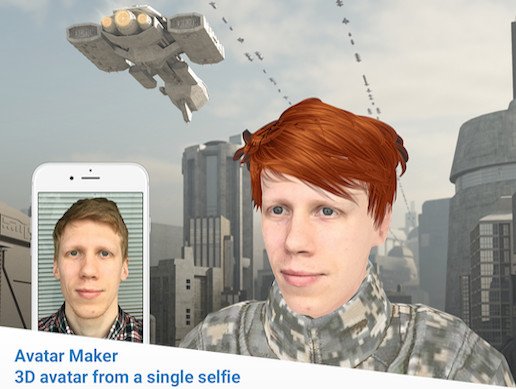
Avatar Maker it is an Editor extension plugin that generates a 3D avatar from one selfie photo. You can use an existing photo or make a new one with a web-camera right from the Unity Editor, and Avatar Maker will instantly turn it into a photorealistic 3D avatar. This avatar can be animated by tracking head movements and facial expressions in a video from your web camera.
Key features of the Avatar Maker Pro
- Automatic generation of a color 3D face model from a single portrait photo.
- 9 Levels of Details for the generated head mesh
- 45 predefined hairstyles.
- Hairstyles recoloring.
- 62 blendshapes support a wide range of facial expressions.
- Pro-version of the plugin allows creating a prefab from a customized avatar to use it in other Unity scenes and export it into FBX or OBJ file formats.
- Realtime avatar animation from video.
- Pro-version of the plugin allows to record tracked movements into animation clip file and export into FBX.
To get started with the plugin please follow these steps
- Import the plugin into an existing Unity project.
- Open Window -> Avatar Maker -> Avatars.
- In the opened window press “Select photo” to generate an avatar from an existing selfie or press “Web Camera” to take a new photo.
- Once the plugin loads a photo, wait about 5-10 seconds while the avatar is being calculated.
- The generated avatar with a best suited hairstyle will be placed into the opened scene.
- You can select this avatar in the “Hierarchy” panel to change the hairstyle or customize the blendshapes.
To animate an avatar, follow these steps
- Add the generated avatar to a Unity scene.
- Open Window -> Avatar Maker -> Facial Motion Capture.
- Connect a web camera to your PC.
- Press “Start Capturing” button.
- Look into the camera, the avatar will track your head pose and mimic your facial expression.
- If you need to record an animation, just press “Start recording” button.
What's New
- Fixed a crash during an avatar generation.
Homepage
Visit my Blog for Unity Assets, GFX Plugins & More!!!
Download without any wait from DDownload link below
Quick check before we show the links
Helps us keep automated scrapers from hammering the filehosts.