iSmartPhoto 1.7.6 (Mac OS X)
This post was published 10 years ago. Download links are most likely obsolete. If that's the case, try asking the uploader to re-upload.
iSmartPhoto 1.7.6 (Mac OS X) | 4 MB
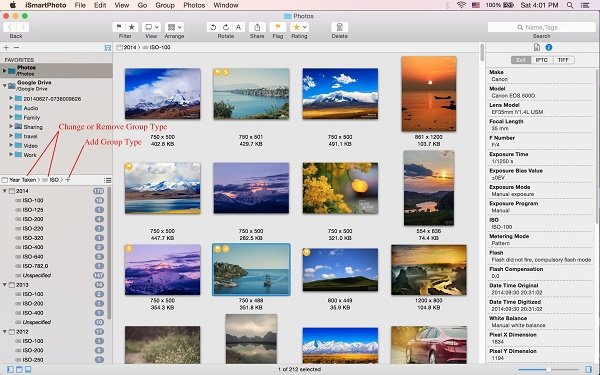
iSmartPhoto is a fast image browser and powerful image organizer. Work with retina displays, Compatible with OS X El Capitan! Unlike iPhoto that require user to import photos into the software, iSmartPhoto pulls your photos from any folder or drive. By just double clicking a single image in Finder or dragging a folder, iSmartPhoto automatically display every image from the folder and subfolders.
Browser
• Browse and display thousands of photos quickly and easily
• Easily select a image folder through folder tree
• Multiple folder selection in folder tree, so then you can view all your photos in more than one folder at once and find all duplicate photos
• Automatically sync your photos in folder with Mac OS X Finder
• Thumbnail view for an overview of your all photos
• Grid view mode, so then you can view more than one photo at once and compare them easily
• Smoothly scroll thumbnail view/browse view/photo bin, even not using Apple Magic Mouse
• Automatically rotate photos with exif orientation
• Browse,zoom and rotate with touch gestures
• Press option key to switch to zoom mode in image browse view, so then you can zoom photo easily by mouse scroll wheel,mouse dragging or mouse click
• Slideshow your photos with transitions
• Inspector with image general information and metadata including EXIF and IPTC
• Support animated gif file
• Open your photos with external application
Organizer
• Automatically group your photos by image general information and metadata including GPS,EXIF and IPTC
• Automatically copy or move your photos with group structure.
• Free combination of maximum three group types
• Easily pick and flag your photos by pressing spacebar key
• Rate and tag your photos
• Quickly find all duplicate photos in your folders.
• Smart filter. Search or filter your photos by a set of rules that you’ve created.
• Multiple tags or file names search in search field. You can separate tags or file names with a comma.
Tools
• Powerful batch rename
• Batch image convert
Export and Share
• Export image to jpeg,png,jpeg-2000,tif,bmp,pdf and other formats.
• Sharing photos with your family and friends on Facebook,Flickr,Twitter and other share service supported by Mac OS X
• Sharing photos with your family and friends via email
• Easily set your photo as os x desktop picture.
Requires Compatibility: OS X 10.7 or later
Home Page - https://ismartphoto.wordpress.com

Password: sanet.me


http://nitroflare.com/view/EB9015EDAE48B2E/iSmartPhoto_1.7.6_%28Mac_OS_X%29.sanet.me.rar
~~~~ Welcome to my Blogs ~~~~
Do not forget to check it every day!
If You should find any files not found, please PM me

Tomorrowland: Software, Video Training (New)
DownloadDownload: Software, Video Training

Ebook - Snorgared: Best Ebooks

Graphic World: Best Graphics

Android SAnet.me Collection Pack by Snorgared < Update Daily >