DxO OpticsPro for Photos 1.3.0 Multilingual MacOSX
This post was published 9 years ago. Download links are most likely obsolete. If that's the case, try asking the uploader to re-upload.
DxO OpticsPro for Photos 1.3.0 Multilingual MacOSX | 33.17 MB
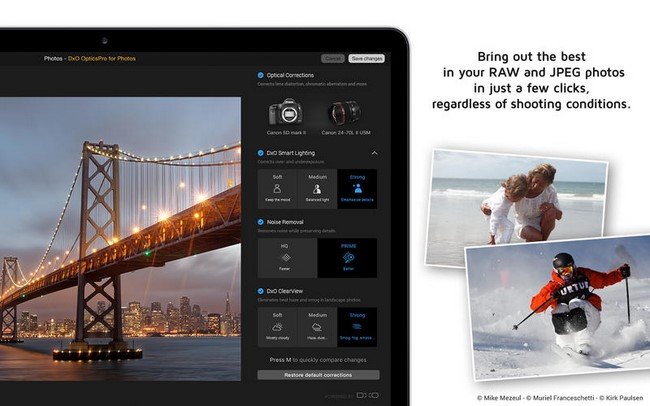
DxO OpticsPro for Photos is designed to provide a seamless image processing workflow for Photographers who are on a Mac, and use OS X Photos as their primary photo application. DxO image processing for supported cameras can now be accessed directly from within the editing mode of OS X Photos, with DxO OpticsPro acting as a 3rd-party extension. The extension is capable of applying optical corrections, White Balance correction, DxO Smart Lighting, PRIME denoising and DxO ClearView haze removal, in a completely new user interface that is simple, clean and intuitive.
One-click corrections for RAW images
• Default corrections include Lens Corrections, White Balance, DxO Smart Lighting, Noise Removal
• Toggle to view the before/after benefits
• Choose Faster (HQ) or Better (PRIME) denoise correction
• Use the magnification loupe for a preview of PRIME denoising
• Restore default corrections with a click
One-click DxO ClearView for RAW images
• Instantly remove haze and smog from landscape photos
• Choose between varying levels of intensity with a click
Customize correction level using sliders
• If One-click is not enough, feel free to adjust automatic correction with sliders
What's New in Version 1.3:
• New extended white balance range
- Temperature and tint settings for raw images has been extended to 50000K and 200, respectively.
- Use this extended range to process underwater images, or blueish images such as concerts.
- We advise you to use PRIME and ClearView when applying extreme temperature or tint corrections.
• More useable color picker
- The color picker tool remains opened until you close it manually.
• Support for 4 new cameras, including
- Canon PowerShot G7X Mark II
- Pentax K-1
- Sony DSC-RX10 III
- Panasonic Lumix DMC-GX80 / GX85 / GX7 Mark II
Requirements: OS X 10.11 or later, 64-bit processor.