Quod Libet 3.5.1 + Portable
This post was published 10 years ago. Download links are most likely obsolete. If that's the case, try asking the uploader to re-upload.
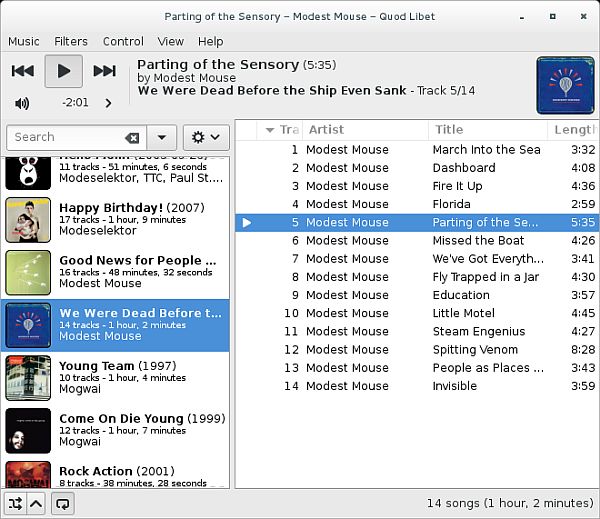
Quod Libet 3.5.1 + Portable | 30.7/29.6 Mb
Quod Libet is a cross-platform audio player which helps individuals listen to songs, create and save playlists to the hard drive, and edit metadata.
The installation process is over in a few seconds, and brings you to a clear-cut interface, which allows both novice and power users to find their way around it, with great ease. It consists of a menu bar, several playback controls (play/pause, next and previous), and a few panels to display the uploaded items.
It is possible to add files and entire directories using the built-in file browser, or the “drag and drop” function. They are going to be displayed in the main window, along with their title, album, and total length.
You can insert ratings (from 0 to 1, or from 0 stars to 5), filter songs according to title, album and artist, or randomize their order, as well as add them to the queue list or to a playlist.
This software program enables you to view information pertaining to a selected file, such as total duration, bit rate, size on disk, last modified date and time, and number of times it has been played. You can create and append lyrics, add songs to favorites, edit tags, jump to a particular picture, use a search function and change the view method.
From the settings panel you can control the visible columns, enable one-click ratings, enable ReplayGain, add folders to the Library and auto-save tag changes.
In conclusion, Quod Libet is a handy piece of software for playing your music and editing its information. It has a good response time, an intuitive interface and does not burden your computer’s performance. If you want to bypass the installation process, you should know there is also a portable version you can take advantage of, Portable Quod Libet.
FEATURES
• Multiple audio back-ends (GStreamer, xine-lib)
• Replay Gain support
• Auto-selects between 'track' and 'album' mode based on current view and play order
• Applies clipping prevention whenever available
• Configurable default (fallback) and pre-amp values to suit any audio setup
• Multimedia key support
• Make changes to many files at once
• Make changes across all supported file formats
• Tag files based on their filenames with configurable formats
• Watch directories and automatically add/remove new music
• Hide songs on removable devices that may not always be there
• Save song ratings and play counts
• Lyrics downloading and saving
• Recognize and display many uncommon tags, as well as any others you want. Especially useful for classical music
• Simple or regular-expression based search
• Constructed playlists
• iTunes/Rhythmbox-like paned browser, but with any tags you want (Genre, Date, etc)
• Automatic tagging via MusicBrainz and CDDB
• On-screen display popups
• Last.fm/AudioScrobbler submission
• Tag character encoding conversion
• Intelligent title-casing of tags
• File Format Support: MP3, Ogg Vorbis / Speex / Opus, FLAC, Musepack, MOD/XM/IT, Wavpack, MPEG-4 AAC, WMA, MIDI, Monkey's Audio
• Player control, status information, and querying of library from the command line
New in version 3.5.1 (2015-10-14)
• Fix volume / mute state resetting on song change with some configurations
• Fix crash when G_FILENAME_ENCODING is set
OS: Windows All
Download
Uploaded - Installer
Uploaded - Portable
Mirror
Rapidgator - Installer
Rapidgator - Portable
Mirror
Turbobit - Installer
Turbobit - Portable
__ __ __ __ __ __ __ __ __