Power Plan Assistant 3.2c
This post was published 10 years ago. Download links are most likely obsolete. If that's the case, try asking the uploader to re-upload.
]
Power Plan Assistant 3.2c | 9.0 Mb
Power Plan Assistant is the world's smartest power management tool for Windows 7, 8 and 10. It's an ultimate manual / automatic power plan switcher with a compact yet very informative Power Icon and other goods for a PC or Mac running Windows via Boot Camp.
Power Plan Assistant is a simple-to-use application with versatile options that helps users put together power plans for various Windows actions, such as battery connection or moving the mouse cursor to a particular corner of the screen. Its features are intuitive enough to be figured out by all types of users, even beginners.
Ad-supported application
The installation procedure does not take a long time to finish. However, since it is ad-supported, Power Plan Assistant offers to download and install third-party components that it does not really need to work properly. These tools can be excluded from setup, though.
Accessibility via the taskbar notifications area
Once launched, Power Plan Assistant creates an icon in the system tray area and shows the current battery plan, charging status, and battery life.
Trigger actions from the left-click menu
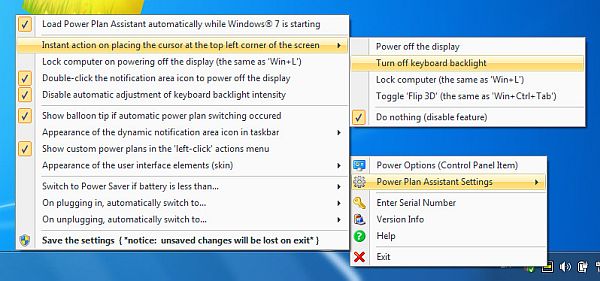
Switching to presentation mode prevents the computer from turning off, regardless of the active power plan: High Performance, Balanced or Power Saver. Plus, you can set the PC to immediately shut down, restart, sleep or sign out, activate the screen saver, as well as power off the display.
Customize settings from the right-click menu
It is possible to immediately open the Windows Power Options area to change the profile. When the mouse cursor moves to the top let corner of the screen, Power Plan Assistant can either lock the computer, power off the display or toggle the Flip 3D feature. You can also set app to turn off the display, shut down the computer or activate the screensaver when double-clicking its icon the tray area, automatically switch to the Power Saver plan when the battery drops under a user-defined level, launch a user-defined application when the power plan changes to any profile you specify, and more. Settings must be saved before exiting the app in order to apply them.
Evaluation and conclusion
The tool does not hog system resources, since it runs on low CPU and RAM. It is very responsive to commands and worked smoothly in our evaluation, without hanging, crashing or popping up error messages. In a nutshell, Power Plan Assistant features many useful options to help you personalize different power plans for Windows, and it can be handled by all types of users easily.
FEATURES
• Switch between the Windows built-in power plans (all power plans, including custom plans, not just 2 of them, as it is when operating via system Power icon);
• Easily observe which power plan is currently active (dynamic application icon in a taskbar notification area changes in accordance with an active power plan, does not matter where it has been changed - in a Control Panel, system Power icon or in the Power Plan Assistant itself);
• Instantly power off the display on user's demand (why wait at least one minute for it to be powered off, wasting the energy?). The display can be waked up then by pressing any key or moving the cursor;
• Switch the power plans automatically.
Whats New in version 3.2c (10/29/2015)
- official site does not provide any info about changes in this version
OS: Windows 7 / 7 64-bit / 8 / 8 64-bit / 10 / 10 64-bit