CuteSdr 1.19
This post was published 10 years ago. Download links are most likely obsolete. If that's the case, try asking the uploader to re-upload.
CuteSdr 1.19 | 14.7 Mb
Although it’s capable of many activities, the computer doesn’t necessarily replace old means, but rather enhances them. The same can be said about TV and radio, which are now more accessible through a PC. A radio station, for instance, can be kept alive with specialized applications, and other processing tools like CuteSdr.
Scan and connect to SDR
The application isn’t quite for everyone, and one of the required components is a SDR system. It is with it that you are able to actually host and use a specific radio signal, whereas CuteSdr comes with the means for demodulation, thus reading modulated carrier waves.
Two components get deployed for better management. One of them is the server, which needs to be launched in order for the SDR component to be identified and connection established. However, it can also be launched through the main window, with more options in order to manually specify the IP address, port, and a search function to find SDRs.
Configure demodulation and noise processing
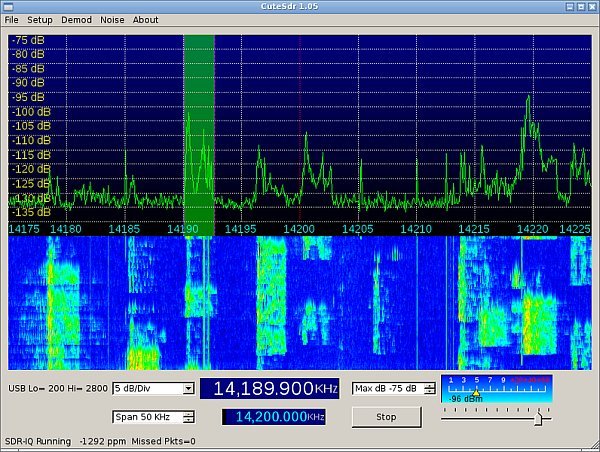
The main window shows a frequency chart that updates in real time as signal comes through. Volume management options let you configure number of decibels, with an additional tool to span signal with a custom amount of Khz. In addition, sessions can be recorded at the press of a button.
For more efficiency, you might want to pay a visit to the demodulation setup panel. There, you can pick frequency type to target, such as AM, SAM, FM, WFM, USB, LSB, CWU, CWL, and PSK, as well as whether or not to use AGC, with corresponding slope, knee, and decay sliders. Moreover, a built-in tool lets you process noise, for better sound quality, with threshold and width sliders.
A few last words
Taking everything into consideration, we can say that CuteSdr is a powerful demodulation utility for radio amateurs that rely on SDR. Setup is easy enough, with different automated tools to search for SDR and connect to custom addresses or ports, while various options make sure input audio is of proper quality.
New in version 1.19 (November 10, 2015)
• Fixed WFM decimator bug
• Added another sample rate selection
• Added .wav file saving support
• Compile with Qt 5.5.1