TLex Suite 2013 8.1.0.1559 Final
This post was published 10 years ago. Download links are most likely obsolete. If that's the case, try asking the uploader to re-upload.
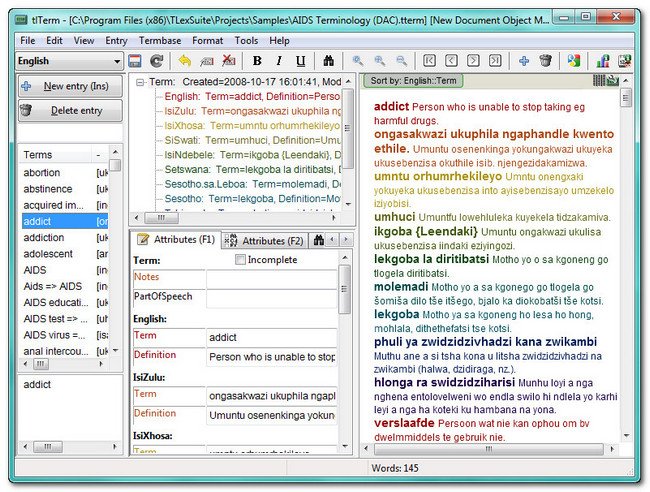
Windows Software | TLex Suite 2013 8.1.0.1559 Final | 44.15 MB
TLex Suite is an advanced application designed to enable you to create dictionaries or terminology lists. TLex Suite is a professional, fully internationalized software suite for creating dictionaries, glossaries or terminology lists, with many specialized features for reducing dictionary production time and cost, and increasing quality and consistency of the resulting dictionary products. TLex is in use by major publishers, including Oxford University Press SA.
Key Features
Real-time preview
Publish to hardcopy, Web, or electronically
Suitable for single-user projects and multi-user teams
Can be fully customized for any conceivable dictionary project
Suitable for all world languages
Includes tlTerm termbase software
Includes tlCorpus concordance software
Advanced styles system with "Smart Styles"
"Smart cross-references" ensures no cross-reference errors in your dictionary
Export to typesetting software such as InDesign, Quark and XPP
Export to MS Word
Automatic numbering
Automatic sorting, configurable for any language
Automated bilingual entry reversal
Integrated Ruler Tool for creating balanced corpus-driven dictionaries
XML-based
Detailed document statistics
Advanced search and "filters"
"Tagging" functionality
"Error checks" and validation
Full Unicode support
Functionality for entering IPA (International Phonetic Alphabet) pronunciation symbols
"Compare/merge" tool for integrating work done offline or by other users/
Whats New in version
[Online Publishing Exporter] New option: "OverridePathImages": [Optional] URL or absolute path or relative path for image files on the publish server; specify this if the images for this document are stored in a different folder online than the main path specified in the main document properties dialog (e.g. if locally you use "./Images" but on the server it should be e.g. "/data/images/" or even an absolute URL, e.g. "http://mysite.com/data/images/"). Using a URL has the advantage that images would work for e.g. Search API clients.
Homepage
Homepage
