WinUAE 3.2.0 / 3.2.1 update + Portable
This post was published 10 years ago. Download links are most likely obsolete. If that's the case, try asking the uploader to re-upload.
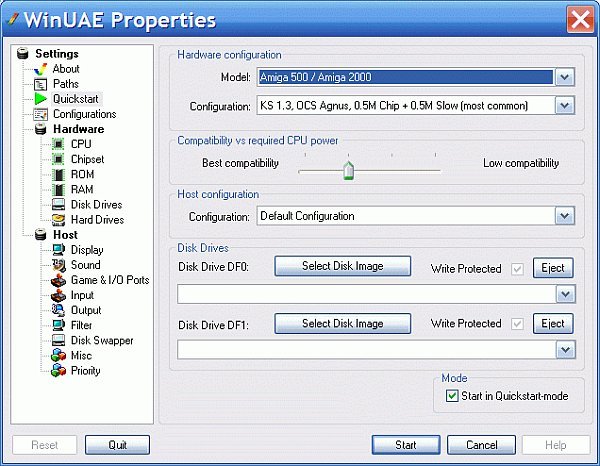
WinUAE 3.2.0 / 3.2.1 update + Portable | 16.3/10.1 Mb
WinUAE has been designed as a software solution capable to emulate the old Commodore Amiga computers 500 / 1000 / 2000 and allow you to run programs built specifically for this type of computing machine.
Smooth installation process
Installing the application on the system is a swift process that does not require too much effort from the user.
Immediately after launch the program seeks the appropriate system ROM file. This can be added from the configuration panel, which is quite extensive and includes numerous options for a more enjoyable experience.
Apart from including multiple presets for hardware emulation WinUAE also allows making some adjustments for a better balance between the compatibility and the necessary CPU power.
It can also emulate drives and offers the possibility to tinker with plenty of settings related to both hardware components as well as the host machine.
Configuring hardware emulation
As far as the emulated hardware is concerned, WinUAE supports multiple CPUs and provides control over the emulation speed, CPU frequency and cache size.
The chipset, along with the memory settings and the storage drives, are also subject to customization. You can choose the type of the floppy that has to be emulated and CD and hard drives (a special file is required for storing the modifications).
Set up the host computer
Among the settings touching on the host computer the user can configure the display and the sound system. However, there are option relating to the game ports, too.
There is also the possibility to configure the input options, which include support for the mouse.
Experience old technology on new hardware
WinUAE seems to have everything it takes for proper emulation of the ancient hardware so that you can load specific content and relieve the days of the past. The application is developed specifically for aficionados that know exactly where to find all the necessary resources.
New in version 3.2.0 (November 12, 2015)
Major updates
• 64-bit compatible 680x0 JIT.
• 64-bit compatible PPC emulation.
• PCI bridgeboards.
• Commodore PC/AT bridgeboards.
• A2410 RTG Zorro II board
• DCTV video port graphics adapter (Partially)
• Genlock "emulation", including transparency and ECS genlock features.
• Directory harddrive and hardfile KS 1.2 and older full autoboot support.
New emulated expansion hardware
Accelerator boards:
• DKB Wildfire
HD controllers
• 3-State Apollo 500/2000
• A2090 previously missing ST-506 support
• Elaborate Bytes A.L.F.
• Kupke Golem Fast SCSI/IDE
• Mainhattan Data Paradox SCSI
• Multi Evolution 500/2000
• OMTI-Adapter
• Spirit Technology HDA-506
• Tecmar T-Card/T-Disk
• Vortex System 2000
• Xebec 9720H
Commodore x86 bridgeboards
• A1060 (A1000 Sidecar)
• A2088
• A2088T
• A2286
• A2386SX
x86 bridgeboard expansion devices
• AT IDE HD controller (A2286 and A2386SX)
• XTIDE Universal BIOS compatible IDE HD controller.
• ISA VGA display card (Cirrus Logic GD542x based)
PCI bridgeboards
• G-REX
• Mediator 1200/4000
• Prometheus
PCI bridgeboard compatible PCI cards
• FM801 sound card
• ES1370 (SB128) sound card
• RTL8029 network card
Notes
• SSE2 capable CPU is now required.
Other Updates
• CD and sound card emulation audio output quality improved.
• 68020/030 prefetch emulation improved.
• High DPI display support improved.
• AGA subpixel scrolling emulated.
• Support shortcut paths (.lnk) in command line.
• More undocumented chipset features supported.
• Right control = right Windows key option.
• Memory accesses only -cycle-exact mode.
• UAE devices (uaeserial etc) are compatible with KS 1.2 and older.
• Improved compatibility with very old A500 config files.
Bug fixes
• WinPCap network mode didn't detect any devices.
• 68030 data cache emulation fixes.
• Custom to/from RTG mode switch didn't check for filter changes.
• JIT on/off on the fly change (outside of GUI) was unreliable.
• Keyboard layout changed (B/C only) during device re-enumeration.
• D3D9 non-shader mode forgot scanline texture when switching modes.
• Audio wave recording created huge broken wave files.
• It was not possible to select HDF PCMCIA SRAM and IDE options.
• Flash ROM and RTC file dialogs didn't allow creation of new files.
New in version 3.2.1 (November 19, 2015)
3.2.0 bugs fixed:
• Loading statefile with enabled FPU crashed.
• Custom chipset display was shifted in some rare situations.
• 64-bit version didn't load DLLs without x64, _64,... extension in name.
• RTG board was not fully disabled if configured RAM config was incompatible.
Other bug fixes:
• 68040+ CPU mode statefile save buffer overflow.
• Unaligned supervisor stack was not allowed in 68020+ modes.
Updates:
• Reduce RAM size and try again if Blizzard RAM allocation fails.
• Switch off triple buffering if windowed mode with DWM active.
OS: Windows All
Download
Uploaded - WinUAE 3.2.0
Uploaded - WinUAE 3.2.1
Mirror
Rapidgator - WinUAE 3.2.0
Rapidgator - WinUAE 3.2.1
Mirror
Turbobit - WinUAE 3.2.0
Turbobit - WinUAE 3.2.1
---
__ __ __ __ __ __ __ __ __