Capture2Text 3.9 Portable
This post was published 9 years ago. Download links are most likely obsolete. If that's the case, try asking the uploader to re-upload.
Capture2Text 3.9 Portable | 70 Mb
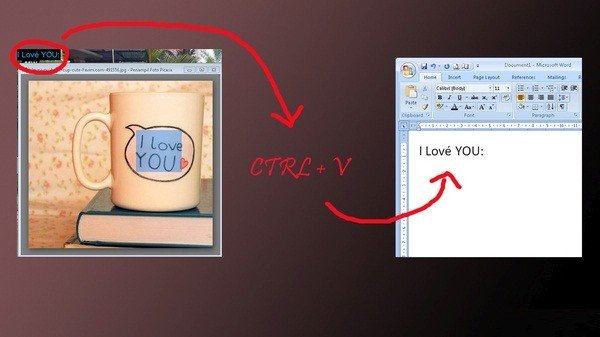
Capture2Text enables users to quickly OCR a small portion of the screen and, by default, save the result to the clipboard. Supports 50+ languages including Chinese, English, French, German, Japanese, Russian, and Spanish. Portable and does not require installation. Capture2Text is a practical and effective software solution whose main purpose is to capture specific areas of your desktop and perform optical character recognition (OCR) operations, then save the results to the clipboard.
The application is operated through the use of keyboard shortcuts, so before using it, it is highly recommended to get used with hotkeys and other settings. You have the possibility to set your own key shortcuts so you can capture the region you want, set the area you want to capture then paste the saved results into a document.
After launching Capture2Text, it will automatically redirect to your system tray menu so you won’t get disturbed from your daily work. Unless you toggle the specified key shortcuts, you won’t even know that the application is still running.
OS: Windows XP / Vista / 7 / 8 / 10 (32/64-bit)
Homepage
Download (Turbobit.net)
http://turbobit.net/jgk2jz98ra0b/Capture2Text39.softarchive.la.rar.html
Mirror (Nitroflare.com)
http://www.nitroflare.com/view/AE18A3CD59EE744
Mirror (Uploaded.net)
http://uploaded.net/file/y499q0sh/Capture2Text39.softarchive.la.rar